
Download Paragon Partition Manager Free Edition – Free, Secure Disk Partitioning Tool for Windows, Mac, and Advanced Storage Management
Paragon Partition Manager Free Edition (64-bit) is a powerful yet accessible disk management utility developed by Paragon Software Group. Designed primarily for Windows users, this free tool simplifies essential partitioning tasks such as creating, resizing, reformatting, and deleting hard disk partitions. With its intuitive interface and automated workflows, it’s ideal for beginners and intermediate users who need reliable control over their storage without the complexity of advanced tools.
The software supports cross-platform compatibility through its NTSF/HFS+ Conversion Wizard, enabling seamless access to Mac-formatted drives on Windows systems. While it lacks the granular control of professional-grade software, it delivers a robust set of features including disk scanning, partition cloning, bad sector testing, and even a hex editor for low-level sector editing. The latest update enhances the user experience with a refreshed color scheme, improved controls, and smoother navigation.
Whether you're preparing a new drive, resizing partitions for a dual-boot setup, or migrating your system to a new SSD, Paragon Partition Manager Free Edition provides a secure and efficient solution—without any cost.
Why Paragon Partition Manager Free Edition Stands Out in Disk Management
When it comes to managing disk partitions on Windows, few free tools offer the balance of functionality and ease of use that Paragon Partition Manager Free Edition delivers. Unlike many freeware alternatives that either lack essential features or come with intrusive ads, Paragon provides a clean, ad-free interface with a focus on core disk operations. The software automatically scans your storage devices, detects existing partitions and free space, and presents users with straightforward options—ideal for those who aren’t familiar with the technicalities of partitioning.
For instance, resizing a partition is as simple as dragging a slider, and creating a new partition requires just a few clicks. This automation significantly reduces the risk of human error, which is critical when dealing with system drives or important data. The inclusion of a NTFS/HFS+ Conversion Wizard is a standout feature, especially for users working across both Windows and Mac environments.
It allows you to convert a Mac-formatted (HFS+) drive to NTFS without data loss, making it a valuable tool for cross-platform users. Additionally, the tool supports advanced functions like disk cloning, which is perfect for upgrading to an SSD or backing up your entire system. The built-in surface test for bad sectors helps identify failing drives before they cause data loss, adding a layer of proactive maintenance.
While the free version doesn’t include every feature found in the paid editions—such as scheduled backups or advanced encryption—it still offers a comprehensive toolkit for everyday users. With regular updates and a strong reputation in the software community, Paragon continues to refine the experience, making this free edition one of the most trustworthy partitioning tools available.
Installation, Usage, and Compatibility Across Platforms
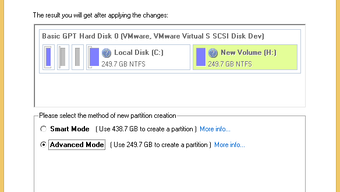
Getting started with Paragon Partition Manager Free Edition is a straightforward process. The installation wizard guides you through each step with clear instructions, ensuring minimal user input is required. Once installed, the software launches quickly and begins scanning your connected drives, displaying a visual representation of all partitions and available space.
This real-time view makes it easy to identify which drive needs attention—whether it’s shrinking a partition to make room for another OS or expanding a volume that’s running low on space. The interface is clean and logically organized, with tabs for tasks like “Partition,” “Tools,” and “Disk.” For beginners, the “Quick Start” wizard walks you through common scenarios such as creating a new partition, resizing an existing one, or converting a drive format. Advanced users will appreciate the deeper tools like the hex editor, which allows direct sector-level editing for forensic or recovery purposes, and the partition merge and move functions, which enable complex reorganization without data loss.
In terms of compatibility, the software is officially available for Windows 10 and 11 (64-bit only). While there is no native Mac version, the NTSF/HFS+ conversion feature bridges the gap for Mac users who need to access their drives on Windows. The tool also supports a wide range of storage types, including SSDs, HDDs, USB drives, and external RAID arrays.
It’s worth noting that some operations—especially those involving system partitions—require a reboot to complete, and the software may prompt you to create a bootable rescue disk for added safety. This is a smart precaution, as partitioning system drives can render your computer unbootable if something goes wrong. Overall, the installation and usage experience is smooth, secure, and well-documented, making it accessible even to those with limited technical knowledge.
Pros and Cons: Is Paragon Partition Manager Free Edition Right for You?
- Pros:
- Free to download and use with no hidden costs or ads
- Intuitive interface ideal for beginners and intermediate users
- Supports cross-platform disk access via NTFS/HFS+ conversion
- Includes essential tools like disk cloning, bad sector testing, and partition resizing
- Regular updates ensure security and compatibility with new Windows versions
- Safe operations with built-in backup and recovery options
- Cons:
- Limited control over partition selection for advanced users
- No native support for macOS or Linux
- Some advanced features (e.g., encryption, scheduled backups) require the paid version
- Documentation can be unclear or overly technical in places
- Cannot resize system partitions without a reboot
Frequently Asked Questions (FAQ)
Is Paragon Partition Manager Free Edition safe to use?
Yes, Paragon Partition Manager Free Edition is safe and secure. The software is developed by a reputable company with a long-standing history in disk management tools. It includes safety features like pre-operation backups, system drive protection, and a bootable rescue disk option. As long as you follow the on-screen instructions and avoid modifying system partitions without proper preparation, the tool poses minimal risk to your data.
Can I resize my system partition using the free version?
Yes, you can resize your system partition, but it often requires a reboot to complete the operation. The software will prompt you to restart your computer during the process, which ensures the changes are applied safely. It’s recommended to back up your data before attempting this, especially if you’re shrinking the partition.
Does it work on Windows 11 and 10?
Yes, Paragon Partition Manager Free Edition is fully compatible with both Windows 10 and Windows 11, provided you’re using the 64-bit version. It’s optimized for modern systems and supports UEFI and legacy boot modes.
Can I use it to clone my entire system to an SSD?
Yes, the free version includes a disk cloning feature that allows you to copy your entire system drive—including the operating system, applications, and data—to a new SSD. This is a great way to upgrade your storage performance without reinstalling Windows.
Is there a Mac version available?
There is no native Mac version of Paragon Partition Manager Free Edition. However, the software includes an NTSF/HFS+ Conversion Wizard that allows Windows users to read and write to Mac-formatted drives, which helps bridge the compatibility gap.
Final Verdict: A Must-Try Free Tool for Smart Disk Management
Paragon Partition Manager Free Edition stands out as one of the most reliable and user-friendly free disk partitioning tools available today. While it may not offer the depth of control found in premium software, it delivers a powerful set of features tailored for everyday users. From resizing partitions and managing disk space to cloning systems and converting file systems, it handles most common tasks with precision and safety.
The inclusion of a hex editor and bad sector tester adds value for more advanced users, even if they’re working within the free version. The updated interface and improved user experience make it a pleasure to use, and the regular updates ensure long-term compatibility. For anyone looking to optimize their storage without spending a dime, this tool is a smart choice.
Whether you're a student, home user, or small business owner, Paragon Partition Manager Free Edition offers peace of mind and efficiency. Don’t miss out—download Paragon Partition Manager Free Edition today and take full control of your disk space with confidence.
CTA: Download Paragon Partition Manager Free Edition Now – Free, Secure, and Easy to Use







